Deploy your Application #
Kuzzle is just a Node.js application that also needs Elasticsearch and Redis to run.
Kuzzle uses native (C++) dependencies. They ship prebuilt for Linux x64 and arm64 (glibc 2.31 or later, e.g. Debian bullseye and later) and for macOS, so npm install needs no compiler there. On Alpine Linux (musl) or other architectures, they are compiled at install time, which needs python3, make and a C++ compiler such as g++.
Kuzzle is tested with Elasticsearch 7.17 and 8.17, and with Redis 8 (see Supported versions).
At Kuzzle we like to use Docker and Docker Compose to quickly deploy applications.
In this guide we will see how to deploy a Kuzzle application on a remote server.
Prerequisites:
- A SSH access to a remote server running on Linux
- Docker and Docker Compose installed on this server
- A Kuzzle application
In this guide we will perform a basic deployment of a Kuzzle application.
For production deployments, we strongly recommend to deploy your application in cluster mode to take advantage of high availability and scalability.
Our team can bring its expertise and support for such deployments: get a quote
Target architecture #
We will deploy the following services in Docker containers:
- Node.js (Kuzzle)
- Elasticsearch
- Redis
We will use Docker Compose as a basic container orchestrator.
Only Kuzzle will be exposed to the internet on the port 7512.
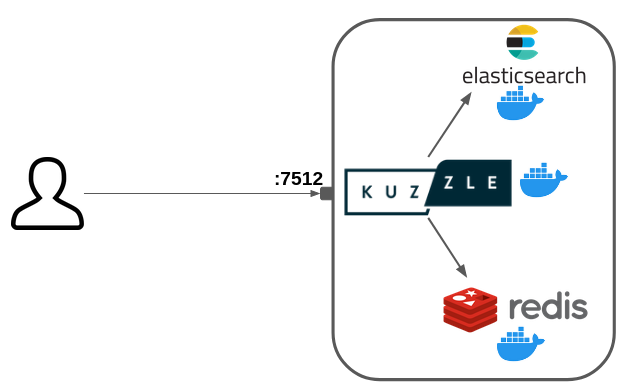
This deployment does not use any SSL encryption (HTTPS).
A production deployment must include a reverse proxy to securize the connection with SSL.
Authentication security in production
You must set the kuzzle_security__authToken__secret environment variable before deploying Kuzzle to production. This secret is used to sign and verify JSON Web Tokens (JWTs) for user authentication.
Without it, Kuzzle generates a random signing seed and stores it in its internal index in Elasticsearch: anyone who can read that index can forge authentication tokens. Setting the secret yourself keeps it out of the database and gives you direct control over it.
Changing the secret immediately invalidates all existing authentication tokens: users have to log in again.
For other configuration options, see the sample configuration file.
Prepare our Docker Compose deployment #
We are going to write a docker-compose.yml file that describes our services.
First, create a deployment/ directory: mkdir deployment/
Then create the deployment/docker-compose.yml file and paste the following content:
---
services:
  kuzzle:
    build:
      context: ../
      dockerfile: deployment/kuzzle.dockerfile
    command: node /var/app/app.js
    restart: always
    container_name: kuzzle
    ports:
      - "7512:7512"
      - "1883:1883"
    depends_on:
      - redis
      - elasticsearch
    environment:
      - kuzzle_services__storageEngine__client__node=http://elasticsearch:9200
      - kuzzle_services__internalCache__node__host=redis
      - kuzzle_services__memoryStorage__node__host=redis
      - kuzzle_security__authToken__secret=<a long random secret>
      - NODE_ENV=production

  redis:
    image: redis:8
    command: redis-server --appendonly yes
    restart: always
    volumes:
      - redis-data:/data

  elasticsearch:
    image: kuzzleio/elasticsearch:7
    restart: always
    ulimits:
      nofile: 65536
    volumes:
      - es-data:/usr/share/elasticsearch/data

volumes:
  es-data:
    driver: local
  redis-data:
    driver: local
This configuration allows to run a Kuzzle application with Node.js alongside Elasticsearch and Redis.
We are going to use a multi-stage Dockerfile to build the application and then use the node:24 image (Kuzzle needs Node.js 22.12 or later) to run the application.
Create the deployment/kuzzle.dockerfile file with the following content:
# builder image
FROM node:24 AS builder

# node:24 is a Debian (glibc) image: Kuzzle's native dependencies are
# prebuilt for it, so there is nothing to compile

ADD . /var/app

WORKDIR /var/app

RUN  npm ci && npm run build && npm prune --omit=dev

# run image
FROM node:24

COPY --from=builder /var/app /var/app
Deploy on your remote server #
Now we are going to use scp (SSH copy) to copy our application on the remote server.
$ scp -r ../playground <user>@<server-ip>:.Then simply connect to your server and run your application with Docker Compose:
$ ssh <user>@<server-ip>

[...]

$ docker compose -f deployment/docker-compose.yml up -d
Your Kuzzle application is now up and running on port 7512!